
Take advantage of our “External Credits” button to report SMC credits.
We always say, “Use what you think you can defend.” The CoAEMSP supports whatever method you choose for Table 5 (EMT Skills), so we have built you a tool to “import” SMC credits while still maintaining the link to the evidence which defends your good work.
When to use:
Most common: Table 5 EMT Skills–attestation is most defensible for students who have come from your own in-house EMT program within the last 6 months
Advanced Placement: One could argue that an existing RN or other medical provider should get “formative” (column 1) credits for patient contacts (ages, conditions). You might find the same is true for certain skills.
Be sure your Advanced Placement policy explains how these are determined (is it automatic or case-by-case approval by Medical Director?) and that the policy is approved by both the Medical Director and your Advisory Committee.
Other Methodology used: Generally, Table 3, column 1 where Sterling relies on real-time completion of skills sheets. Some clients prefer to teach skills in some way besides a Skill Session based on good old-fashioned skills sheets (if this is you, you should look at our Skills Sheets labeled “+cognitive”–showing a student is “competent” should include assessing whether they know why and when to DO the skill!). In these cases, just modify the attestation language to direct an auditor to wherever your proof exists.
Process to add external credits
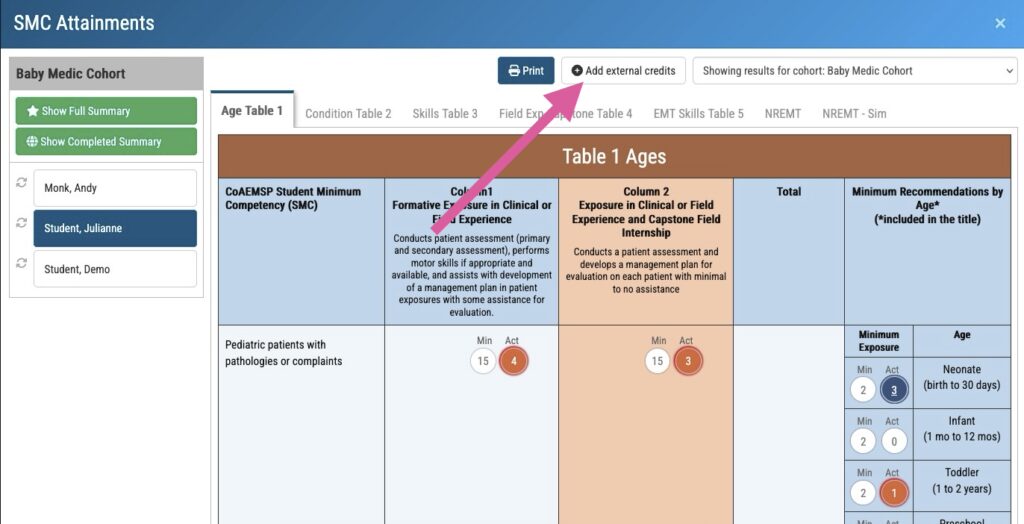
Navigate to the cohort SMC and then choose the specific student. At the top, click External Credits.
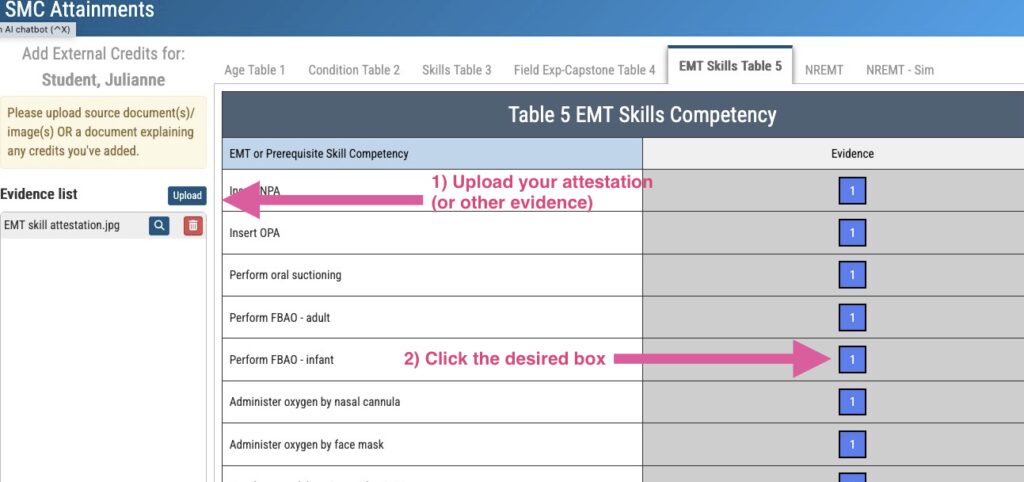
Next, Upload to place the attestation (or whatever evidence you choose). Then, navigate to the desired box where you wish to add credits. Click it!
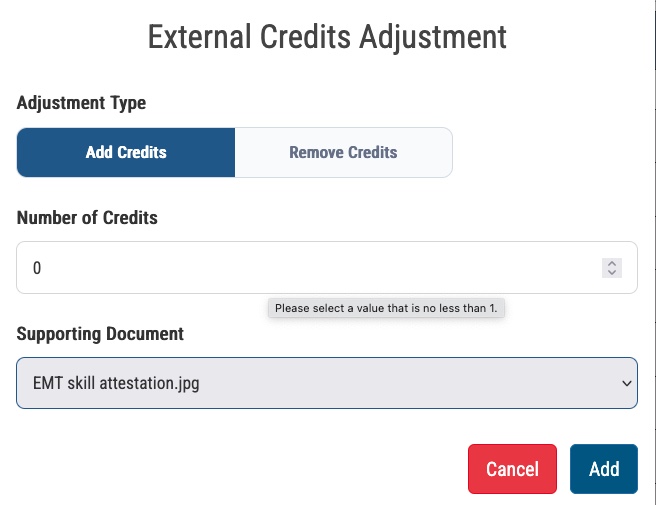
Here, click Add Credits. Fill in the desired number. Then, from the Supporting Document dropdown list, choose the appropriate evidence.
That’s it! Use at will–just be sure your evidence could defend your decision even if you aren’t there for a surprise spot inspection!
How it Looks
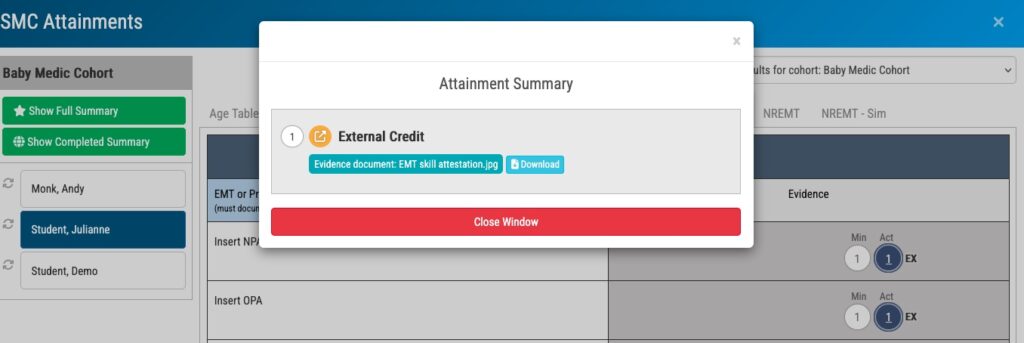
The student SMC will then have a small “EX” next to any SMC credits which contain External Credits.
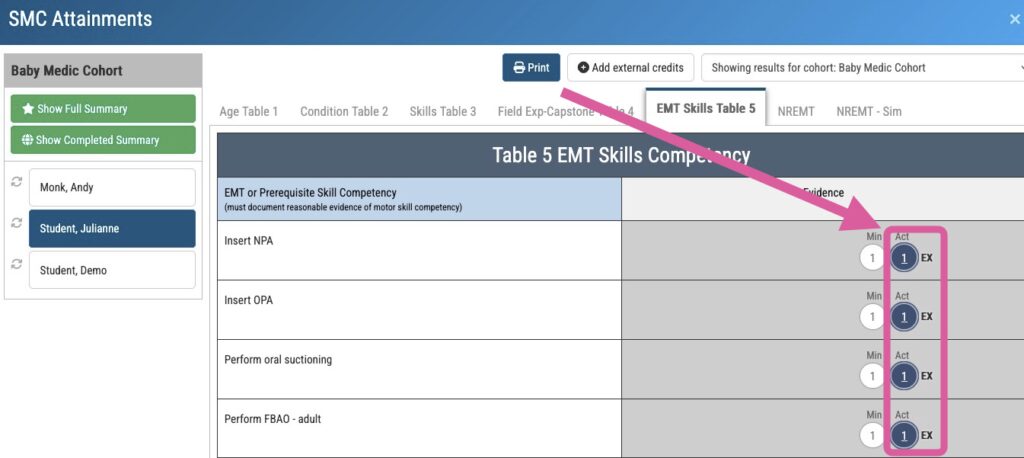
When you click the “Actual” number of credits (which pulls up the sources of any and all credits in the cell), you are able to immediately view the evidence…or show it to an inspector! Thus, we keep the “chain of evidence” intact!
Attestation Language
Here, you an download a format for your attestation, customize it as you wish, and use it to get those SMC’s looking beautiful! Instructions are within the document.
After you download the format, choose the language below which is most applicable to your needs. The language is all generic so that you can use it for multiple students. Anywhere you see ALL CAPS, you should replace that with the correct information.
Table 5 EMT Skills
This credit awarded in accordance with (NAME OF POLICY) policy found (PG NUMBER OF SYLLABUS OR HANDBOOK) approved by Advisory Committee and Medical Director.
Student completed EMT certification within the last 6 months and is, therefore, considered competent in EMT skills.
Advanced Placement
This credit awarded in accordance with (NAME OF POLICY) policy found (PG NUMBER OF SYLLABUS OR HANDBOOK) approved by Advisory Committee and Medical Director.
Student is a certified or licensed Healthcare Provider who meets requirements within the policy. Standard/approved procedure (PG NUMBER OF HANDBOOK) was followed to determine the number of credits awarded.
Other Methodologies Used (Table 3, Col 1)
Formative and Initial Competency assessments of the student skill performance occurred outside of this platform (Sterling Credentials). For each credit awarded, proof an be found at (INSERT LOCATION OF RECORDS).
Concluding Remarks
You never know which auditor or inspector you’re gonna get. WE want to CYA which is why we want to keep the link to your evidence within the SMC itself.
You work really hard. Proving it shouldn’t hurt!